
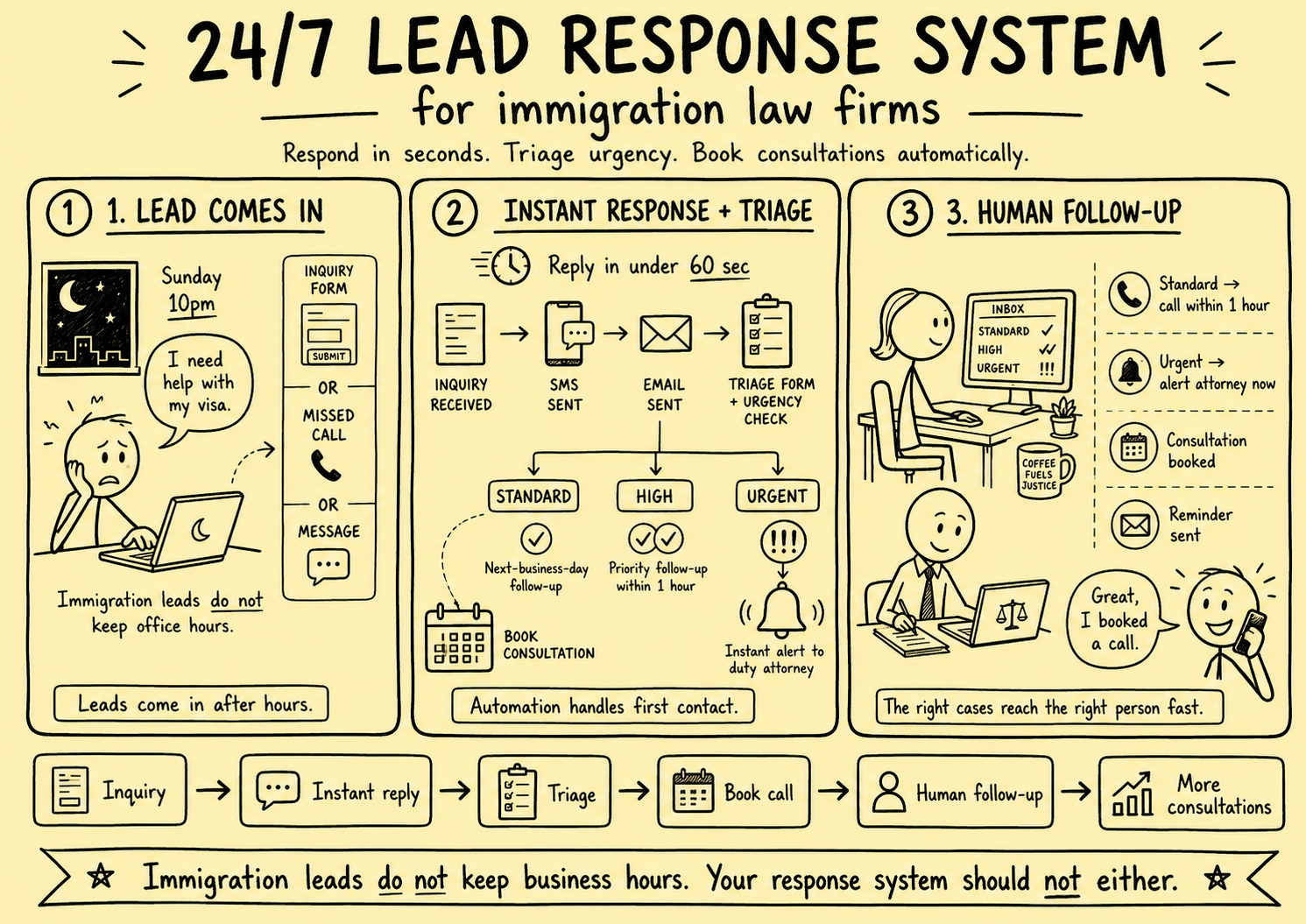
The most common time for someone to submit an immigration inquiry is not during business hours.
It is Sunday evening, when they finally have a quiet moment to research their situation after a week of anxiety. It is 10pm on a Wednesday, after their employer called to say their work authorisation needs renewing. It is Saturday morning, when they open a letter from the Home Office.
Immigration concerns do not adhere to a 9-to-5 schedule. The fear, the urgency, and the decision to seek legal help arrive on their own timetable.
The vast majority of immigration law firms respond to these inquiries the next business day, or the day after. By that point, the prospect has either found another firm or resigned themselves to waiting — but either way, the moment of peak engagement and decision-readiness has passed.
This guide walks through the exact architecture of a 24/7 lead response system designed for immigration law practices.
Are You Overwhelmed With Leads, or Struggling to Get Them Consistently?
Before diving into the system, it's worth naming which problem you're solving — because the same infrastructure serves both, in different ways.
If your firm is overwhelmed with leads, a 24/7 response system is your release valve. It handles first contact automatically so your team isn't buried in follow-up, ensures no enquiry is missed during busy periods, and routes cases by urgency so attorneys spend time on the work that matters — not chasing missed calls.
If your firm doesn't have a steady pipeline, a 24/7 response system is your conversion multiplier. When leads are scarce, letting even one slip away is genuinely costly. A firm that responds at 10pm on a Sunday — personalised, warm, and with a booking link — converts at a dramatically higher rate than one that follows up two days later. Every enquiry your marketing generates becomes worth significantly more when the intake system is airtight.
The architecture below works for both. Build it once, and it serves you regardless of what the lead volume looks like this week.
Why "24/7" Is Not About Staffing Around the Clock
When most immigration lawyers hear "24/7 response," they imagine hiring overnight staff or fielding calls from their personal phone at 11pm. That is not what a well-built system requires.
A 24/7 response system uses automation to handle the immediate first-touch — the acknowledgement, the personalisation, and the consultation booking — while routing genuinely urgent cases to a human in a structured way. The vast majority of after-hours inquiries can be fully handled by automation until business hours resume. The minority that are truly urgent (emergency court appearances, imminent removal, detention situations) get flagged and escalated immediately.
The system has three layers:
- Instant automated response — fires within 60 seconds of any inquiry, at any hour
- Intelligent triage — identifies urgency level and routes accordingly
- Human follow-up protocol — defines exactly when and how a human enters the conversation
Layer 1: Instant Automated Response
The First Message
The first automated response should arrive within 60 seconds of a form submission or missed call. It should do three things:
- Acknowledge specifically — reference what they enquired about (spouse visa, asylum, work permit, etc.) rather than sending a generic "thanks for contacting us"
- Set expectations — tell them when they will hear from a human and what the next step is
- Enable self-service — give them an option to book a consultation immediately without waiting for a callback
Example SMS (fires 30 seconds after form submission):
"Hi [First Name], thank you for reaching out to [Firm Name] about your [visa type] situation. A member of our immigration team will call you within the next hour. In the meantime, you can book a free 20-minute consultation here: [Calendly link]. — [Firm Name]"
Example follow-up email (fires 2 minutes after form submission):
Subject: Your Enquiry — [Firm Name] Immigration Law
>
Hi [First Name],
>
Thank you for reaching out. We've received your message regarding your [enquiry topic].
>
Here's what happens next:
- A member of our team will call you within 1 hour (or first thing tomorrow morning if you've reached us outside office hours)
- In the meantime, you can book a free 20-minute initial consultation at a time that works for you: [Calendly link]
>
We know immigration situations can be stressful. You're in the right place.
>
[Firm Name] Immigration Team
This combination of SMS + email achieves two things: it ensures delivery across multiple channels, and it gives the prospect two opportunities to self-schedule before any human involvement is required.
Tools to Build This
The technical implementation depends on how your website is set up and what practice management software you use. Common approaches:
Option A: Native practice management tools
- Clio Grow, Lawmatics, or MyCase have built-in intake automation with SMS and email triggers
- Best if you are already using or willing to adopt one of these platforms
- Integration with calendar tools is usually native
Option B: CRM + automation platform
- HubSpot CRM (free tier is sufficient) + HubSpot Workflows
- Connect your contact form to HubSpot via Zapier or native embed
- Workflows trigger the SMS (via Twilio integration) and email sequences automatically
- Good option if you want more control over the automation logic
Option C: n8n or Zapier + email/SMS services
- Most flexible; most setup required
- Connect form submissions to n8n, which triggers Twilio (SMS), Gmail/Mailchimp (email), and Calendly (scheduling)
- Best if you want a fully custom system without paying per-seat CRM fees
Layer 2: Intelligent Triage
Not all immigration inquiries carry the same urgency. A general question about the naturalisation process is different from someone facing removal in 72 hours. Your system should be able to distinguish between them and respond accordingly.
Urgency Classification
Set up your intake form to capture the information needed for triage. At a minimum:
Urgency indicator field (required):
- "Is this an emergency?" (Yes / No)
- Or a dropdown: "How soon do you need help?" with options: Within 24 hours / Within the next week / Within the next month / I'm just exploring
Case type field (required):
- Family visas
- Work visas / sponsorship
- Asylum / refugee status
- Deportation / removal proceedings
- Naturalisation / citizenship
- Student visas
- Other
Deadline field (optional but powerful):
- "Do you have an upcoming deadline or court date?" (Yes / No / Not sure)
- If Yes: "Please tell us the date and what it relates to"
With this information captured at the point of submission, your automation can apply different logic to different inquiry types:
Standard inquiry → automated acknowledgement + next-business-day follow-up queue
Time-sensitive inquiry (visa expiry within 30 days, upcoming appointment) → automated acknowledgement + same-day follow-up queue + internal notification to intake lead
Emergency inquiry (deportation proceedings, detention, court date within 7 days) → automated acknowledgement + immediate SMS/push notification to duty attorney or senior intake person
Building the Triage Logic
In HubSpot Workflows or n8n, this is implemented with conditional branches:
- If `urgency = Yes` OR `deadline = within 7 days`: set lead priority = URGENT, send internal Slack/SMS alert, move to top of call queue
- If `case_type = deportation` OR `case_type = asylum`: set lead priority = HIGH, tag for attorney review within 2 hours
- Default: lead priority = STANDARD, enter normal follow-up sequence
Layer 3: Human Follow-Up Protocol
Automation handles the first touch. Humans close the case. The protocol defines exactly when and how humans enter the conversation.
The On-Call Rota
Even with automation handling first contact, every firm should have a clear protocol for who is responsible for follow-up during and after hours.
During business hours (e.g., 8am–6pm Monday–Friday):
- Intake coordinator checks the lead queue every 30 minutes
- All STANDARD and HIGH priority leads are called within 1 hour of submission
- URGENT leads are called within 15 minutes
After hours (evenings, weekends, bank holidays):
- Automated system handles first contact and books consultations for next-day
- URGENT leads trigger an immediate SMS to the duty attorney
- The duty attorney role rotates weekly among attorneys
The Virtual Receptionist Alternative
For firms that cannot staff intake internally during business hours (typically smaller practices with fewer than 5 attorneys), a virtual receptionist service is often the most cost-effective solution.
Services like Smith.ai, Ruby Receptionists, or Clio's virtual intake service provide trained receptionists who answer calls, conduct initial screening, and book consultations on behalf of your firm — all using scripts and protocols you define.
Cost: typically £200–£500/month for a small immigration practice, depending on call volume.
Return: capturing even one additional retained client per month at an average case value of £2,500 more than covers the cost.
The Consultation Booking System
Getting someone to book a consultation before the first human call is one of the most powerful levers in immigration intake.
Firms that include a direct booking link in their first automated response see:
- Reduced no-show rates (prospects who self-schedule are more committed)
- Shorter time-to-consultation (they book immediately instead of waiting for a callback to arrange a time)
- Better prepared consultations (you can send pre-consultation materials as part of the booking confirmation)
What Your Booking System Should Include
Calendar link — Calendly, Acuity, or your practice management software's booking module
Consultation type — offer a free 15–20 minute initial consultation (this removes friction and is standard practice in immigration law)
Pre-consultation questionnaire — sent automatically after booking, asking for:
- Their name, nationality, and immigration history
- What they need help with specifically
- Any upcoming deadlines or court dates
- Documents they have available
This questionnaire accomplishes two things: it helps the attorney prepare, and it gives the prospect a sense that the firm is thorough and already engaged with their case.
Confirmation email and SMS — fires immediately after booking and again 24 hours before the consultation with the meeting link (for video) or firm address (for in-person)
Reminder sequence — 24-hour reminder, 1-hour reminder. Automated reminders reduce no-shows by 30–50%.
Tracking and Improving the System
A 24/7 response system is not set-and-forget. Track these metrics weekly:
| Metric | Target |
|---|---|
| Time to first automated response | < 60 seconds |
| Time to first human contact (business hours) | < 60 minutes |
| Time to first human contact (after hours) | < 60 minutes of next business open |
| Percentage of inquiries reaching consultation | > 40% |
| Consultation no-show rate | < 20% |
| Conversion from consultation to retained client | > 50% |
If any metric is below target, diagnose where the breakdown is occurring. Common issues:
- High time to first human contact → intake coordinator workflow bottleneck; consider virtual receptionist
- High no-show rate → add additional reminder touches; consider offering WhatsApp communication option
- Low consultation-to-retained rate → intake quality issue; review attorney consultation process, not the lead capture system
The Competitive Reality
In most UK cities and suburban areas, the immigration law market has consolidated around 10–30 firms that dominate Google search results and referral networks. The quality of legal work across the top tier is relatively similar.
What differentiates the firms that grow from the ones that plateau is almost always the front-end client experience: how quickly they respond, how personal the first interaction feels, and how easy they make it to take the next step.
For high-volume firms: a 24/7 system stops the silent revenue leak — the cases that slip through because no one got to them in time. It lets you scale enquiry volume without scaling intake headcount at the same rate.
For firms building their pipeline: it turns every hard-won lead into a real opportunity. When you're running Google ads or leaning on referrals to grow, you cannot afford a 40% no-response rate or a two-day callback window. The system below makes every single enquiry count.
A firm that responds in 30 seconds at 10pm on a Sunday — with a personalised message that references exactly what the prospect needs and a link to book a consultation immediately — is not just convenient. It is a signal of the kind of firm they are.
Build the system. Capture the cases.
If you need help implementing this kind of intake automation for your immigration practice, Systemify Automation can have the system built and running in two weeks. We handle the technical setup, write the sequences, and train your team on the workflow.
Brokerage data stays governed. Material deal decisions stay human.
We design business broker systems around least-privilege access, documented data flows, protected credentials, traceable activity, and approval gates. Systemify does not use client information to train its own models. When a workflow uses an external AI provider, its purpose, data fields, and retention approach are documented and approved before client data is transferred.
Looking for business-broker systems?
Our current work focuses on helping business brokers build stronger buyer and seller pipelines and more controlled deal operations.
Talk to a Broker Systems Expert