
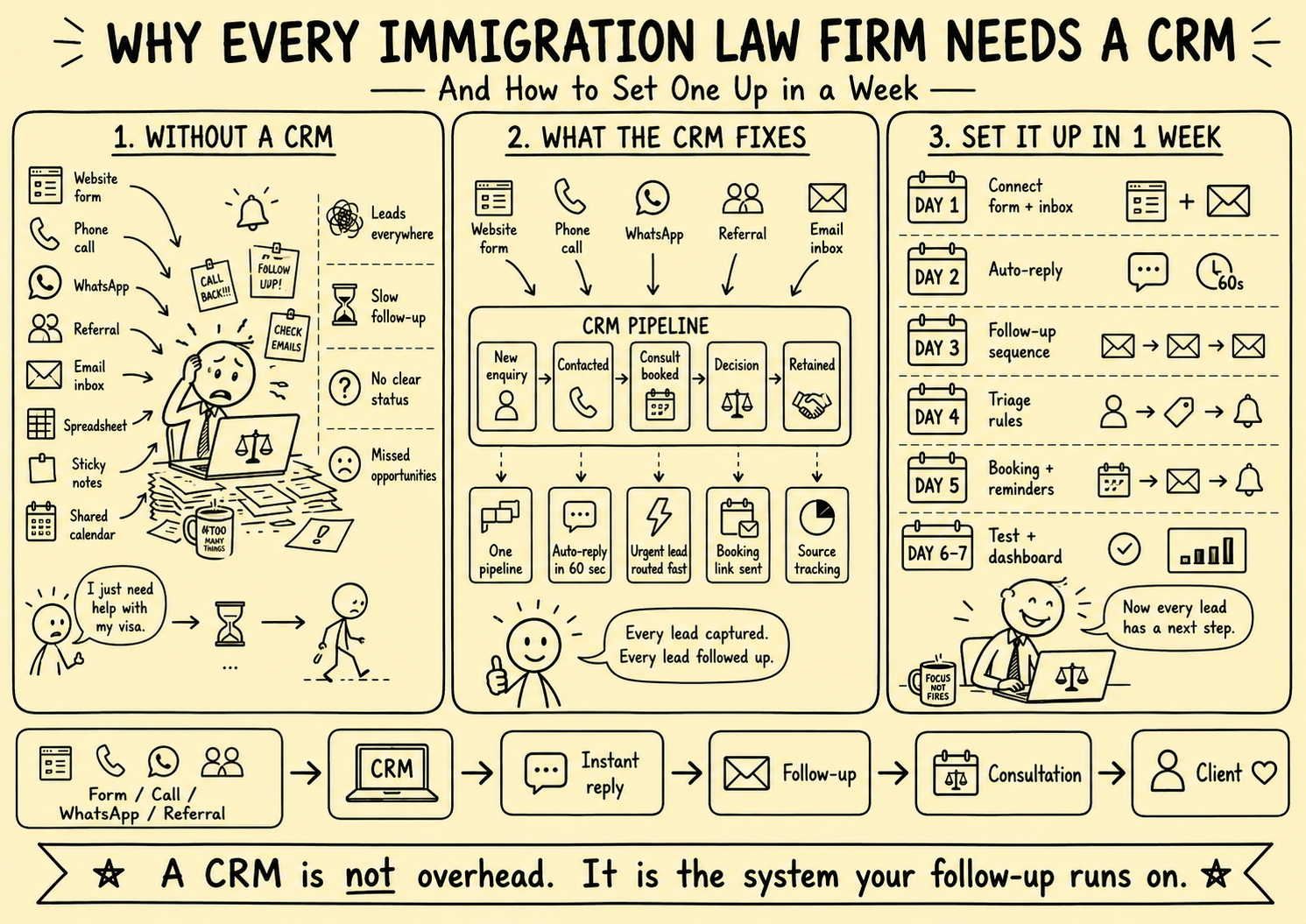
Most immigration law firms manage their new enquiries through a combination of email inboxes, mental notes, sticky notes, spreadsheets, and shared calendars. It works until it doesn't — and when it breaks down, it costs the firm clients it never even knew it lost.
A CRM (Customer Relationship Management system) is the infrastructure layer that makes speed to lead possible at scale. It is the difference between responding to enquiries as a reactive, manual process — and running a front end to your firm that operates like a machine.
This guide explains why CRMs are particularly valuable for immigration practices, how to choose the right one for your firm's situation, and how to have it fully configured and running within a week.
Why Immigration Law Firms Specifically Need a CRM
The Volume Problem
Even a mid-size immigration practice generates 80–200 new enquiries per month across website forms, calls, referrals, WhatsApp, and legal directory listings. Without a centralised system, these enquiries land in different places, get seen by different people, and are followed up (or not) with no consistency.
A CRM creates a single pipeline view where every enquiry — regardless of how it arrived — appears in one place with a timestamp, a status, and a clear next action. Nothing falls through the cracks because the system is designed to make gaps visible.
For overwhelmed firms: a CRM transforms chaotic intake into a managed process. You can see at a glance which leads are waiting for a call, which consultations are booked, and which cases are pending a decision — all without anyone manually updating a spreadsheet.
For pipeline-building firms: a CRM makes your thin pipeline visible and actionable. You see every lead you have, where each one is in the process, and exactly where leads are dropping off. This data is essential for improving conversion and for knowing where to invest in lead generation.
The Speed to Lead Problem
Speed to lead (responding within 5 minutes) is virtually impossible without a CRM triggering automated responses. The CRM is the system that:
- Detects when a new lead has entered the pipeline
- Fires the automated acknowledgement sequence
- Routes the lead to the correct person based on case type and urgency
- Sends reminders to intake staff if a lead hasn't been contacted within the target window
Without a CRM, all of this depends on someone checking an inbox — which means it only works when that person is at their desk.
The Attribution Problem
For firms trying to grow their pipeline: if you don't know which channel is generating your best clients, you cannot invest intelligently in lead generation. A CRM with source tracking tells you: "40% of our retained clients came from Google Ads, 30% from referrals, 20% from organic search, 10% from directories." That data is worth thousands of pounds in advertising budget optimisation.
CRM Options for Immigration Law Firms
Option 1: Clio Grow (Best for Established Practices)
Clio Grow is built specifically for law firms. It handles intake forms, lead tracking, email sequences, consultation scheduling, and pipeline management — and integrates natively with Clio Manage for case management.
Best for: Firms that are already using or planning to use Clio Manage; firms that want a legal-specific tool with compliance features built in.
Key features for immigration intake:
- Custom intake forms for different visa/case types
- Automated email sequences triggered by lead status changes
- Calendly-style booking module built in
- Pipeline view showing every lead by stage
- Native document collection for intake questionnaires
Cost: ~£70–£120/month (Practice Advisor tier)
Setup time: 3–5 days for a basic configuration
Option 2: HubSpot CRM (Best for Growth-Stage Firms)
HubSpot's free CRM tier is surprisingly powerful — it includes contact management, deal pipelines, email tracking, and basic automation. Upgrading to the Starter tier (£40–£60/month) adds email sequences, form automation, and meeting scheduling.
Best for: Firms that want a low-cost, flexible system and are comfortable with some technical setup; firms that want to track lead sources and run reporting.
Key features for immigration intake:
- Free contact management and pipeline view
- Form embeds that auto-create contacts in CRM on submission
- Sequences for automated follow-up emails
- Meeting link integration (works with Google Calendar and Outlook)
- Source attribution reporting in the paid tiers
Cost: Free tier for basics; £40–£60/month for Starter (most firms need this tier)
Setup time: 2–4 days for basic configuration
Option 3: Lawmatics (Best for Automated Sequences)
Lawmatics is purpose-built for law firm intake and marketing automation. It has more sophisticated automation capabilities than Clio Grow — including conditional email sequences, lead scoring, and intake form branching logic.
Best for: Firms that want advanced automation, including conditional sequences based on visa type, urgency, or prior interactions.
Cost: ~£100–£200/month
Setup time: 5–7 days for full configuration
Setting Up Your CRM in One Week
The following is a realistic one-week implementation plan for an immigration law firm using HubSpot or Clio Grow.
Day 1: Audit and Connect
Morning:
- Sign up for your chosen CRM
- Connect your website contact form to the CRM (most tools have a native embed or a Zapier integration)
- Connect your email inbox (Google Workspace or Outlook) so sent/received emails are tracked against contacts
Afternoon:
- Create your pipeline stages:
- New Enquiry (not yet contacted)
- Contacted — Awaiting Response
- Consultation Booked
- Consultation Completed — Awaiting Decision
- Retained (Active Client)
- Not Retained (with reason: price, chose other firm, not qualified, etc.)
- Import any existing leads from your inbox or spreadsheet into the new pipeline
Day 2: Build the First Response Automation
Morning:
- Create the automated acknowledgement email (personalised, with booking link)
- Set up the automation trigger: "When a new contact is created via form, send Email Sequence 1"
- Test the trigger by submitting your own contact form
Afternoon:
- Set up SMS acknowledgement via Twilio integration (if using HubSpot) or via your CRM's native SMS feature (Clio Grow has this)
- Test the full first-touch sequence end to end — submit a test form, verify SMS and email arrive within 60 seconds
Day 3: Build the Follow-Up Sequence
Build the 7-day follow-up sequence for leads that don't immediately book a consultation:
- Day 0: Automated acknowledgement (done)
- Day 1: SMS check-in
- Day 3: Email with a relevant resource (e.g., your guide to spouse visa applications)
- Day 7: Final email with booking link and urgency message
Test each step manually.
Day 4: Set Up Triage and Internal Routing
- Create urgency classification based on form fields (see triage logic in previous posts)
- Set up internal notification rules: "If lead is classified URGENT, send SMS to [intake lead's phone number]"
- Create a Slack or email notification for any lead that has been in stage 1 (New Enquiry) for more than 30 minutes without being contacted
Day 5: Set Up Consultation Booking and Pre-Consult Automation
- Configure your booking calendar (Calendly or built-in) with 20-minute consultation slots
- Create the pre-consultation email sequence that fires after booking:
- Immediate: confirmation with meeting details
- 24 hours before: reminder + pre-consultation questionnaire link
- 1 hour before: reminder with meeting link or firm address
Day 6–7: Training, Testing, and Refinement
- Walk your intake team through the new system
- Run 5–10 test scenarios through the pipeline (different enquiry types, different urgency levels)
- Refine any automation logic that doesn't behave as expected
- Set up your tracking dashboard: leads this week, contacts made within 1 hour, consultations booked, conversions to retained
The Metrics That Tell You Whether Your CRM Is Working
Track these weekly once the system is live:
| Metric | What It Tells You |
|---|---|
| New leads this week | Is lead generation improving? |
| % contacted within 1 hour | Is the automation triggering and is the team responsive? |
| % of leads booking a consultation | Is the first response effective? |
| % of consultations resulting in retained client | Is the consultation process effective? |
| Time from enquiry to retained client | Overall pipeline efficiency |
| Lead source breakdown | Which channels deliver the best clients? |
For overwhelmed firms: focus on "% contacted within 1 hour" and "time from enquiry to retained client" — these reveal where cases are being lost.
For pipeline-building firms: focus on "lead source breakdown" and "% of leads booking a consultation" — these tell you where to invest and whether your conversion system is working.
The First Step
If your firm is not using a CRM today, the first step is simple: choose a platform and connect your website contact form to it this week. Even a basic HubSpot free account with a connected contact form and a 60-second auto-reply will immediately improve your conversion rate.
Everything else — the sequences, the triage, the analytics — can be layered on top.
Systemify Automation sets up complete CRM and intake automation systems for immigration law firms. If you want the system built, tested, and ready to go without the setup time, get in touch.
Brokerage data stays governed. Material deal decisions stay human.
We design business broker systems around least-privilege access, documented data flows, protected credentials, traceable activity, and approval gates. Systemify does not use client information to train its own models. When a workflow uses an external AI provider, its purpose, data fields, and retention approach are documented and approved before client data is transferred.
Looking for business-broker systems?
Our current work focuses on helping business brokers build stronger buyer and seller pipelines and more controlled deal operations.
Talk to a Broker Systems Expert