
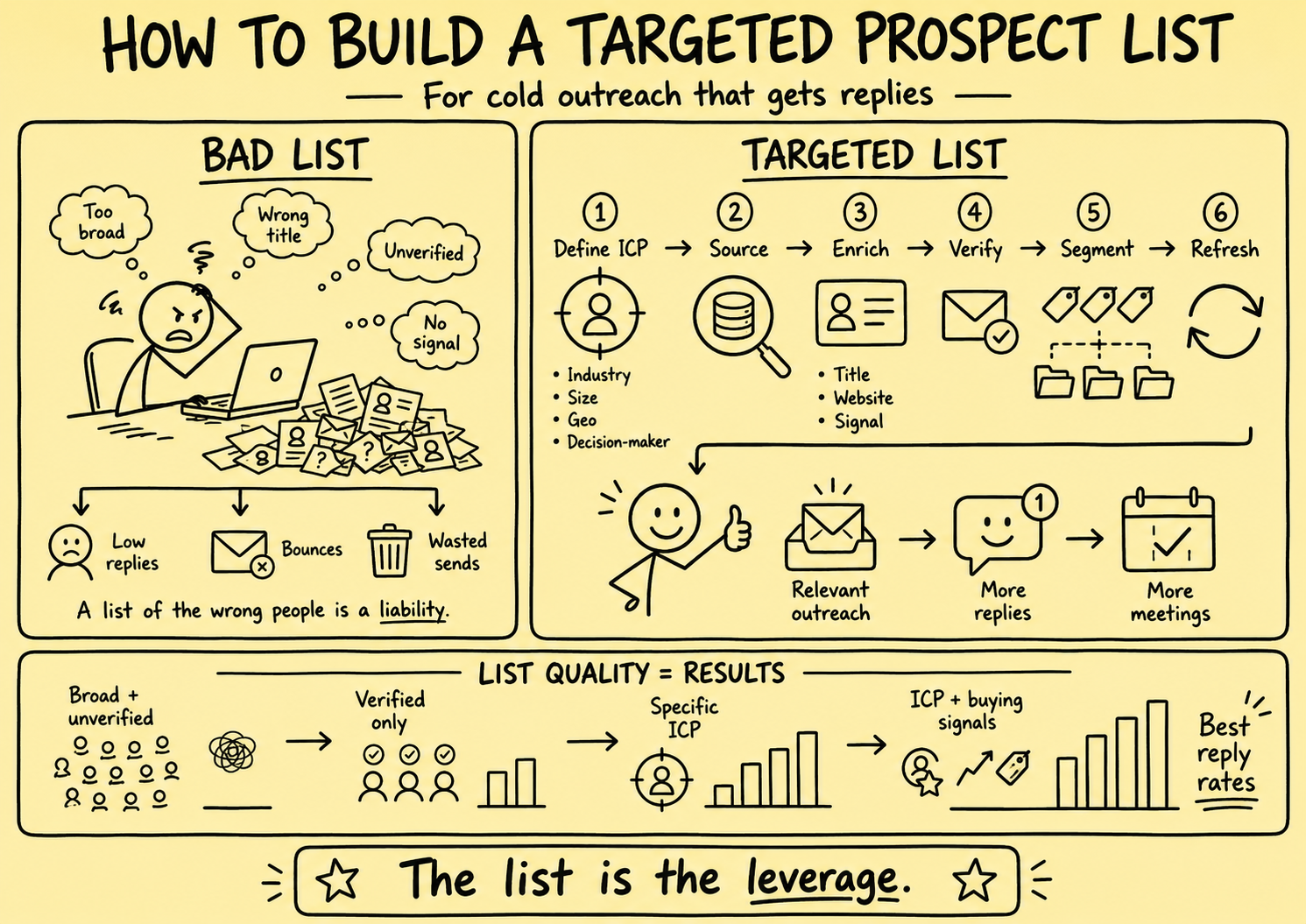
A prospect list is not merely a spreadsheet of names and email addresses. For a business brokerage, it is a governed decision record: who or what the record represents, where each fact came from, when it was observed, why it is necessary, whether it may be used for the proposed purpose, who reviewed it, and what stops further use.
This article previously claimed list quality determined outreach results more than any other factor, promised that segmentation made copy three times more relevant, published invented reply-rate tiers, presented vendor contact counts, prices, and rankings as facts, recommended scraping and export tools, prescribed 90-day and weekly refresh cycles, and described technically “valid” email addresses as safe to send. Those claims, vendor prescriptions, arbitrary schedules, and obsolete service links were removed.
Direct answer: Define one seller or buyer sourcing purpose, collect only the fields needed for that purpose, preserve field-level provenance and observation dates, separate facts from inferences, verify identity and current relevance, resolve duplicates, apply jurisdiction and channel rules, check suppression before enrichment and contact, require human approval, and retain or delete data under a documented policy.
This is operating guidance, not legal, privacy, marketing, valuation, tax, accounting, licensing, or transaction advice. Requirements vary by jurisdiction, channel, source, recipient, subscriber type, relationship, purpose, and data. Qualified owners should approve the actual policy.
Start with a purpose, not a vendor filter
Write a purpose statement before collecting data.
A useful statement identifies:
- Whether the workflow supports seller sourcing, buyer development, referral review, or relationship reactivation
- The brokerage service and territory involved
- The people and entities expected to be relevant
- The proposed communication channel and message purpose
- The minimum fields needed to decide whether human review is appropriate
- The lawful-use and transparency review required for the jurisdiction
- The owner, review date, stop conditions, and retention rule
“Find businesses that may want to sell” is too vague. It encourages the system to turn ordinary public facts into unsupported seller intent.
A narrower example is: identify business entities in the brokerage’s approved territory whose public industry and size facts fit a documented service scope, then place records with adequate provenance into a broker review queue. That statement does not authorize contact or claim the owner wants to sell.
Separate seller and buyer data models
Seller and buyer development require different evidence.
| Context | Useful factual evidence | Inferences to avoid |
|---|---|---|
| Seller sourcing | Entity identity, public business category, operating location, public role, source and date | Willingness to sell, urgency, distress, valuation, personal motive |
| Buyer development | Person or entity identity, stated criteria, dated self-reported experience, approved qualification evidence | Available capital, authority, creditworthiness, certainty to close |
| Referral review | Referrer identity, introduction scope, relationship provenance, stated permission | Permission from the introduced person, endorsement, guaranteed fit |
| Dormant relationship | Prior interaction, original purpose, last verified preference, owner, retention state | Continued interest, current role, renewed permission |
| Live transaction | Matter ID, role, authorization, access level, approved contact details | Permission to reuse matter data for unrelated prospecting |
Do not merge these contexts into one generic “lead score.” A buyer may also be an owner. An adviser may act for several parties. The same person can have different permissions, roles, owners, and confidentiality boundaries in different matters.
Public does not mean unrestricted
The ICO guidance on collecting information and generating leads explains that personal information may be found in public sources such as company registers, websites, social media, and press coverage, but public availability does not remove fairness, lawfulness, transparency, and reasonable-expectation considerations in the UK context.
A public social profile, directory entry, company filing, event attendee list, or article can have a purpose that differs from direct marketing. Before reuse, document:
- Exact source and source type
- Source terms or access conditions reviewed
- Original context and likely expectations
- Collection method and responsible party
- Observation date and permitted purpose
- Whether the information is personal data
- Required notice or transparency action
- Jurisdiction and channel decision
- Objections, suppression, and other restrictions
Do not bypass access controls, ignore platform terms, collect hidden information, or assume a contractor’s scraping method is acceptable because a CSV was delivered.
Create a source register before importing records
Each source should have an approved register entry.
| Field | What to record |
|---|---|
| Source owner | Organization or person providing the data |
| Source location | URL, export, directory, referral, event, or system |
| Collection method | Manual review, licensed export, authorized integration, referral, or direct submission |
| Original purpose | Why the source originally held or published the information |
| Terms reviewed | Applicable source, license, contract, or platform conditions |
| Data categories | Exact fields supplied or derived |
| Geography | People and entities likely covered |
| Update model | Snapshot, periodic feed, event update, or unknown |
| Quality evidence | Coverage, known limitations, validation method, and sample review |
| Downstream rights | Permitted use, sharing, enrichment, retention, correction, and deletion |
| Review | Approver, decision, date, conditions, and next review |
A vendor’s marketing page is not proof of provenance, accuracy, permission, or coverage. Request the necessary contractual and technical evidence before procurement, and validate a representative sample against authoritative sources.
Design fields around evidence
Avoid columns such as “likely seller,” “motivated,” “qualified buyer,” or “good fit” without a definition and source.
For each field, store:
- Field name and business purpose
- Value and normalized value
- Source URL or source record
- Observed-at and imported-at times
- Fact, self-report, third-party assertion, model output, or human opinion
- Confidence where appropriate
- Reviewer and review time
- Expiry or recheck condition
- Sensitivity and access class
- Correction and supersession history
Keep source facts separate from interpretations. “The website listed Jane Doe as president on September 1” can be a dated observation. “Jane owns the company and wants to sell” is not established by that observation.
The ICO accuracy guidance emphasizes source recording, reasonable accuracy checks, dated historical facts, clear labeling of opinions, and correction or erasure when information is inaccurate. It also explains that the effort required depends on how the information will be used.
Collect the minimum necessary data
More enrichment is not automatically better.
The ICO data-minimisation guidance describes personal data as needing to be adequate, relevant, and limited to what is necessary for the stated purpose in the UK context.
For an initial entity-fit review, the brokerage may need a business name, location, public industry evidence, source, date, and assigned territory. It may not need personal phone numbers, home addresses, family information, inferred age, detailed social activity, financial estimates, or a large behavioral profile.
Use a field-necessity review:
- What decision uses this field?
- Is that decision authorized at this stage?
- Is a less intrusive field sufficient?
- How will the value be verified and corrected?
- Who can access it?
- When will it be deleted or re-reviewed?
- What harm follows if it is wrong or disclosed?
Reject enrichment fields that have no approved decision, owner, or deletion rule.
Distinguish verification from eligibility
Email verification services typically estimate whether an address may accept mail. Their status labels are vendor-specific and can be wrong or stale.
A technical result does not establish:
- That the address belongs to the intended person
- That the person still holds the recorded role
- That the mailbox is appropriate for the purpose
- That the person or entity is a seller or buyer prospect
- That the recipient expects or permits the communication
- That no objection, opt-out, or suppression exists
- That the planned message meets applicable requirements
Store the verifier, method version, result, time, and limitations. Do not rename a vendor status “safe to send.” Recheck identity, eligibility, purpose, and suppression independently immediately before queueing any communication.
Google’s current email sender guidelines set technical and behavioral requirements for mail sent to personal Gmail accounts. Authentication and provider acceptance are separate from whether the brokerage should have selected a record or sent a particular message.
Apply B2B rules at record and action level
The ICO B2B marketing guidance distinguishes electronic mail, live calls, automated calls, personal data, subscriber types, preference services, and objections in the UK context. A company-domain address is not a universal exemption, and sole traders and certain partnerships may be treated differently from corporate subscribers.
The FTC CAN-SPAM business guide explains that U.S. commercial-email rules apply to B2B messages and addresses sender identity, subject lines, postal information, advertising identification, opt-out mechanisms and timing, message purpose, and responsibility for vendors.
Build an action-level eligibility record containing:
- Recipient and entity identity
- Jurisdiction logic and evidence
- Subscriber or recipient classification where relevant
- Relationship and source provenance
- Message purpose and channel
- Applicable policy and rule version
- Transparency or notice state
- Permission or approved basis where required
- Preference-service and suppression results
- Decision, reviewer, and time
Re-evaluate when the channel, purpose, sender, jurisdiction, relationship, or message type changes.
Check suppression before enrichment and before contact
Suppressing only at the final send step can waste enrichment, expose data unnecessarily, and allow prohibited records into downstream tools.
Check the authoritative preference service:
- Before acquiring or enriching a known identity where policy requires it
- Before adding a record to an outreach audience
- When generating tasks or drafts
- Immediately before a message or call
- When replaying delayed or failed events
Store the scope of the preference: person or entity, address or number, channel, brand, topic, relationship, source, and effective time. An opt-out from marketing does not necessarily require deletion of the minimal suppression evidence needed to prevent future contact.
Stop pending actions when an objection, withdrawal, opt-out, complaint, or restriction arrives. Propagate the change across the CRM, enrichment, messaging, calling, spreadsheet, and workflow systems, then reconcile failures.
Build identity resolution with uncertainty
Entity and person matching is not a simple exact-email join.
Use stable identifiers where available, preserve aliases, and distinguish:
- Business entity from trading name or location
- Person from role or mailbox
- Current from former employment
- Parent, subsidiary, franchise, and independent operator
- Adviser, owner, buyer, employee, and referral-source roles
- Shared, role-based, personal, and company-controlled addresses
Assign match confidence and route uncertain merges to review. A false merge can import an objection into the wrong record, disclose relationship history, overwrite a valid role, or send confidential matter context to the wrong person.
Keep merge and split history, source links, surviving identifiers, field-level winners, suppressed aliases, and rollback evidence.
Score review priority, not human worth or intent
A useful score can prioritize records for research if every component has a documented purpose and source.
Possible factual components include:
- Entity falls inside an approved industry and territory
- Public operating facts fit a documented service scope
- Required fields have current source evidence
- Identity match exceeds the review threshold
- No unresolved restriction or duplicate exists
- A broker requested review of that segment
Do not score or infer seller motivation, financial distress, age, health, family circumstances, ethnicity, religion, political views, or other sensitive personal conditions. Do not infer buyer funds, authority, creditworthiness, or ability to close from job title, online behavior, or a model-generated profile.
AI can extract candidate facts from approved sources, suggest duplicate matches, flag contradictions, and prioritize missing-data review. Preserve the source passage and model version. Require a human to confirm material facts, contact eligibility, seller or buyer status, and any consequential workflow transition.
Segment only when the distinction changes a legitimate decision
Segmentation should not exist merely to create more personalization tokens.
Useful distinctions may include:
- Seller versus buyer purpose
- Territory and licensed service coverage
- Entity type or business category under an approved model
- Existing relationship versus new prospect
- Direct submission, referral, licensed source, or public-source research
- Verified owner role versus unresolved role
- Current, due-for-review, contradicted, or expired evidence
- Permitted channel and preference state
Document why each segment is relevant, which fields define it, how missing values are treated, and who reviews errors. Measure complaints, corrections, exclusions, and downstream qualification—not only reply volume.
Do not present a public announcement, hiring activity, funding event, website change, or social post as a “buying signal” without defining what it actually supports. It may justify research; it rarely proves seller intent or transaction readiness.
Refresh by field volatility and event
There is no universal rule that every list should be refreshed weekly or every 90 days.
Set recheck conditions by field:
- Stable entity identifiers may change infrequently but still need correction handling
- Roles, employers, email addresses, and phone numbers can change quickly
- Permission, objections, and suppression must reflect the latest verified event
- Seller or buyer criteria can change whenever the person updates them
- Public-source observations remain historical facts but may no longer describe current conditions
- Qualification and confidential-access states require matter-specific review
Trigger review when new evidence conflicts, a delivery failure occurs, the person corrects a fact, a vendor sends an update, the source disappears, the purpose changes, the retention date arrives, or a high-impact action is proposed.
Display “last observed,” “last verified,” and “valid for this decision” separately. A record can be accurately historical and still be unsuitable for current outreach.
Control vendors and researchers
Before granting access or accepting a dataset, document:
- Approved source and collection method
- Contracted purpose and prohibited uses
- Data categories and people covered
- Credentials, roles, and least-privilege access
- Storage location, subprocessors, transfer, and retention
- Quality sampling and rejection criteria
- Suppression input and output handling
- Correction, deletion, export, and incident procedures
- Audit evidence and termination plan
Do not let a researcher choose sources, fields, scraping tools, enrichment vendors, or eligibility rules without written boundaries. Pay for reviewed evidence and quality, not only row count.
Never upload confidential buyer, seller, valuation, mandate, or live-deal data to a prospecting service merely to “enrich” it. Use isolated identifiers and the minimum approved fields.
Use explicit workflow states
A controlled sourcing workflow might use:
- Source proposed
- Source reviewed and approved or rejected
- Record collected with provenance
- Identity unresolved, matched, or disputed
- Minimum fields complete or incomplete
- Accuracy reviewed, contradicted, or expired
- Eligibility pending, approved, blocked, or superseded
- Broker review accepted or rejected
- Action drafted and approved or canceled
- Contacted, failed, replied, objected, or no response
- Qualified, deferred, archived, restricted, or deleted
Each transition needs an actor, time, evidence, rule version, and reason. Make imports and updates idempotent so a retry does not create duplicate people, tasks, messages, or suppression conflicts.
Measure data quality and control quality
Track:
- Records by approved source, purpose, and relationship type
- Percentage with field-level source and observation dates
- Missing required fields and unresolved identities
- Duplicate, false-merge, and correction rates
- Vendor disagreements and sample rejection rates
- Expired or contradicted evidence
- Records blocked before enrichment, drafting, or contact
- Preference and suppression propagation failures
- Wrong-person, wrong-role, and wrong-entity replies
- Human approvals, corrections, rejections, and cancellations
- Complaints, incidents, and unauthorized disclosures
- Accepted seller and buyer review outcomes by evidence state
- Records archived, restricted, or deleted under policy
Do not treat list size, enriched-field count, verification pass rate, reply rate, or meeting volume as sufficient evidence of quality. A smaller dataset with reliable provenance and controls may be more usable than a large opaque export, but the business result must still be measured locally.
Test the complete data story
Use synthetic records and a small, authorized pilot before production.
Test:
- Seller, buyer, referral, adviser, and dual-role identities
- Corporate, sole-trader, partnership, and uncertain entity states where relevant
- Direct, public, licensed, referred, and unknown sources
- Correct, stale, contradicted, duplicate, and fabricated values
- Current, historical, inferred, and self-reported fields
- Objections in forms, replies, call notes, imports, and free text
- Identity merges, splits, aliases, reassignment, and former roles
- Source deletion, vendor correction, and policy-version change
- Delayed, duplicated, reordered, and partially failed events
- Approval, rejection, cancellation, export, retention, and deletion
Acceptance criteria should cover provenance completeness, field necessity, identity accuracy, suppression behavior, duplicate prevention, reviewer visibility, correction propagation, confidential-data isolation, retention, and recovery.
The practical conclusion
The goal is not the biggest list or the richest profile. It is a bounded seller or buyer research dataset that the brokerage can explain, correct, govern, and use appropriately.
Define the purpose first. Preserve sources and dates. Collect only what the decision needs. Keep facts, opinions, and model outputs separate. Treat verification as one technical signal, not authorization. Resolve identity carefully. Apply suppression early. Refresh based on risk and evidence. Keep material seller, buyer, valuation, qualification, and outreach decisions under accountable human control.
To design the surrounding workflow, review broker growth operations and operations streamlining, or request a Business Broker Pipeline & Operations Assessment.
Frequently Asked Questions
Can a business broker use publicly available data for outreach?
Public availability is not blanket permission. The brokerage should assess the source, expectations, jurisdiction, purpose, transparency, applicable marketing rules, objections, and platform terms before collection or contact. Record the decision and supporting evidence.
Does a verified email address mean it is safe to contact?
No. Verification may indicate technical deliverability under a vendor’s method. It does not establish identity, role, ownership, current relevance, marketing eligibility, permission, absence of objections, or an appropriate message purpose.
Which fields belong in a seller prospect dataset?
Collect only fields necessary for the approved sourcing purpose. Typical records may include business identity, public role evidence, source URL, observation date, territory, relationship owner, eligibility decision, and suppression status. Do not infer willingness to sell, valuation, financial condition, or personal circumstances from weak signals.
How often should prospect data be refreshed?
There is no universal 30-, 90-, or weekly schedule. Refresh based on the field’s volatility, source age, intended use, risk of error, new contradictory evidence, vendor updates, and retention policy. Recheck consequential or recipient-facing facts immediately before use.
Can AI automatically score broker prospects?
AI can assist with source extraction, deduplication suggestions, and review prioritization when outputs remain linked to evidence. It should not invent seller intent, buyer capacity, authority, valuation, qualification, or outreach eligibility, and it should not make consequential relationship decisions without accountable human review.
Sources and evidence notes
Primary or first-party materials reviewed for this article. Scope and limitations are stated rather than silently generalized.
- Collect information and generate leadsUK Information Commissioner’s Office · Accessed
Current UK guidance on collecting direct-marketing data from people, public sources, third parties, and profiling. It explains that public availability does not remove fairness, lawfulness, transparency, and expectation considerations.
- Business-to-business marketingUK Information Commissioner’s Office · Accessed
Current UK guidance on B2B marketing across electronic mail, live calls, automated calls, personal data, subscriber types, preference services, transparency, objections, and suppression.
- Principle (c): Data minimisationUK Information Commissioner’s Office · Accessed
Current UK guidance stating that personal data should be adequate, relevant, and limited to what is necessary for the stated purpose. The page notes that guidance is under review following legislative change.
- Principle (d): AccuracyUK Information Commissioner’s Office · Accessed
Current UK guidance on source recording, reasonable accuracy checks, dated historical facts, opinions, challenges, correction, and erasure. The page notes that guidance is under review following legislative change.
- CAN-SPAM Act: A Compliance Guide for BusinessU.S. Federal Trade Commission · Accessed
Official U.S. guidance on commercial-email identity, subject lines, advertising identification, postal information, opt-out mechanisms and timing, message purpose, and responsibility for vendors.
- Email sender guidelinesGoogle · Accessed
Current requirements and recommendations for email sent to personal Gmail accounts, including authentication, DNS, TLS, message formatting, spam-rate monitoring, and additional obligations for high-volume senders.
Brokerage data stays governed. Material deal decisions stay human.
We design business broker systems around least-privilege access, documented data flows, protected credentials, traceable activity, and approval gates. Systemify does not use client information to train its own models. When a workflow uses an external AI provider, its purpose, data fields, and retention approach are documented and approved before client data is transferred.
Apply this to your brokerage
We can assess your buyer and seller pipeline, valuation and vetting workflows, communications, documents, controls, and handoffs before recommending what to build.
Talk to a Broker Systems Expert