
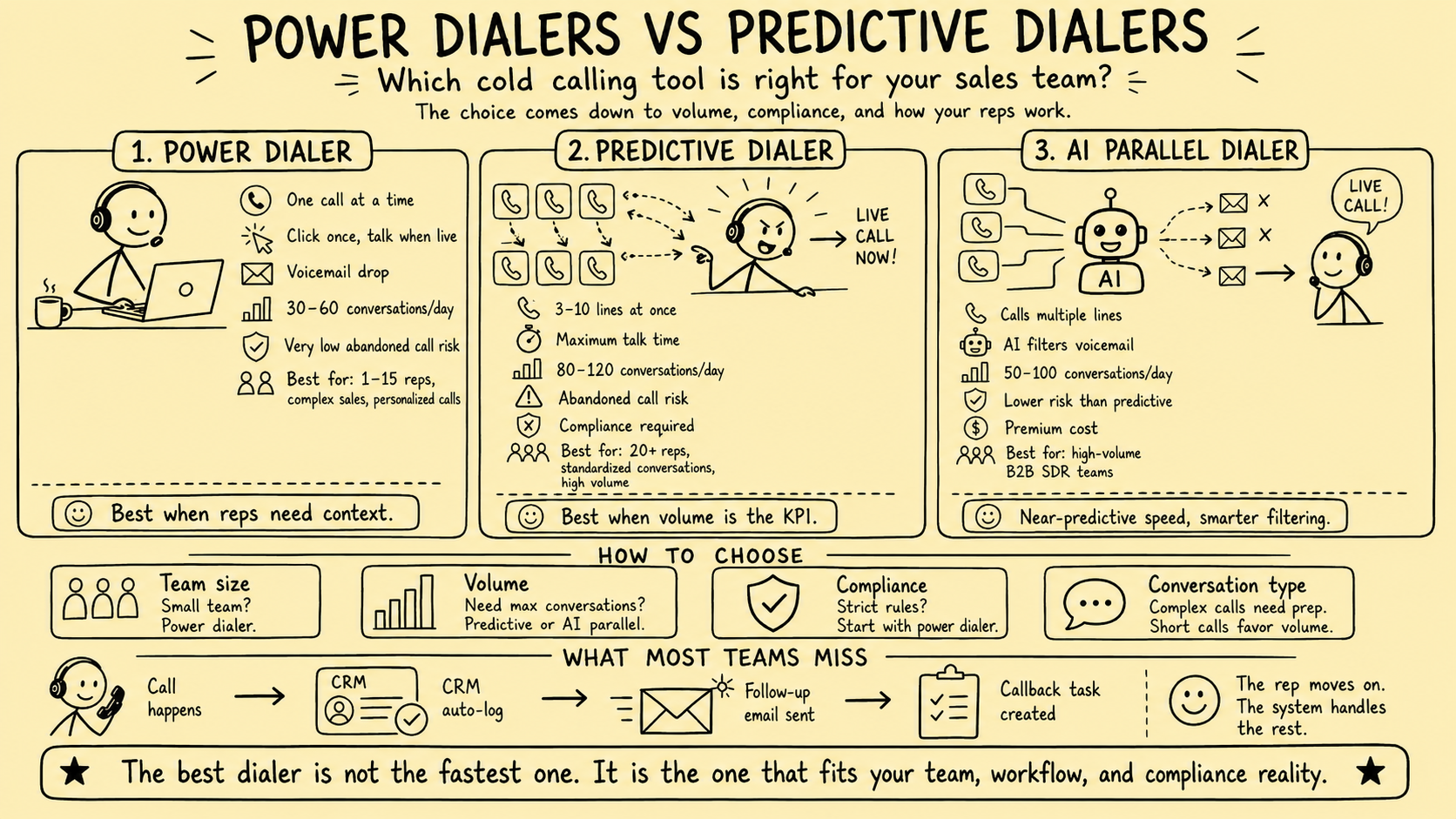
A dialer should not be selected from a calls-per-hour table. The same product can behave differently by mode, configuration, campaign, carrier, number type, and agent availability. For a business broker, the decision must also account for owner trust, buyer and seller context, confidential relationships, and the team’s ability to handle a live response responsibly.
This article previously published unsupported estimates for manual work, conversations, talk time, throughput, team size, and software prices. It also named vendors, described AI parallel dialing as lower-risk without evidence, and made broad legal conclusions by region. Those claims and recommendations were removed.
Direct answer: Define the exact calling use case, obtain the required legal and operational approval, inspect how each dialing mode actually behaves, test abandonment and suppression, preserve CRM and relationship context, and select only from measured results in the brokerage’s own controlled environment.
This is an operating framework, not legal advice. Telemarketing, privacy, call-recording, consumer-protection, professional, and communications rules vary by country, state, recipient, number type, offer, relationship, technology, and purpose. Have qualified counsel review the actual program and configuration.
Start with the call, not the dialer
Brokerages make different kinds of calls that should not share one default mode.
| Call use case | Context required before connection | Default control question |
|---|---|---|
| Seller sourcing | Source, owner identity, fit, jurisdiction, objections, exclusions | Is this recipient and number eligible for this call and method? |
| Buyer acquisition | Buyer profile, source, mandate fit, prior interactions | Is the message accurate without implying qualification? |
| Buyer or seller follow-up | Relationship owner, agreed next step, communication history | Should this remain outside a prospecting campaign? |
| Dormant opportunity review | Inactivity reason, current permissions, deal status, sensitivity | Has anything changed that requires human review before contact? |
| Active deal communication | Authorized parties, confidentiality, stage, open items | Should the call use a tightly controlled relationship workflow? |
A broker may need time to review a business, ownership record, mandate, buyer criteria, or prior discussion before speaking. Removing that preparation time can reduce quality or expose the wrong information even if it increases attempts.
Understand the modes vendors may offer
Names are inconsistent across products. Require a technical demonstration and written description.
Manual and click-to-call
The user selects a record and initiates one call. Click-to-call may remove number entry while leaving timing and record selection under human control. This can suit context-heavy conversations, but it still needs eligibility, suppression, identity, recording, and logging controls.
Preview dialing
The system presents the next record and its approved context before the user initiates or accepts the call. The review interval may be fixed, flexible, or user-controlled. Confirm whether the system ever starts a call without an explicit action.
Power or progressive dialing
These labels often describe a system that starts another call after the caller becomes available and the prior disposition is complete. Some products use the terms differently. Verify whether it calls one number or several, whether the caller can pause, how no-answer and voicemail outcomes work, and whether the next record appears before connection.
Predictive dialing
Predictive systems may initiate more calls than the current number of available representatives based on expected answer and agent-availability patterns. This can create a call answered by a person when no representative is ready. The exact pacing model, campaign denominator, connection delay, recorded message, ring time, agent pool, and records matter.
Parallel dialing
“Parallel” often means several numbers are attempted for one caller, sometimes with answer-machine or voice detection. The label does not establish whether calls can be abandoned or whether artificial or prerecorded voice rules apply. Ask what every called person experiences when several people answer.
Voicemail drop, prerecorded, and artificial voice
A button labeled “voicemail drop” can conceal materially different behavior. Audio might be delivered after a person answers, after machine detection, through a prerecorded message player, or by another method. Synthetic voice introduces an additional distinction.
Document precisely when audio begins, what detection occurs, whether a live recipient can hear it, what identity and opt-out mechanisms exist, and what consent is required. Do not treat voicemail as a harmless exception by default.
What current primary guidance means for evaluation
United States
The FTC Telemarketing Sales Rule guide explains that predictive dialers can produce abandoned calls and describes a safe harbor with multiple conditions, including campaign-level measurement, ring time, connection timing, a prescribed recorded identification message in specified circumstances, and records. It also covers do-not-call controls, caller ID, calling times, prerecorded messages, disclosures, and the interaction with FCC and state rules.
Do not reduce the guide to one percentage. The applicability of the TSR, exemptions, the campaign definition, every safe-harbor condition, prerecorded-message provisions, FCC rules, state law, and the actual facts still require review.
The FCC’s FCC 24-84 order discusses TCPA restrictions on certain artificial or prerecorded voice calls to residential lines and autodialed or artificial/prerecorded calls to covered wireless and other services, subject to consent and statutory exceptions. A vendor’s category name does not decide whether the technology and call fall within a restriction.
United Kingdom
The ICO business-to-business marketing guidance covers PECR rules for live and automated B2B marketing calls, TPS and CTPS screening, prior objections, caller identity, consent, and UK GDPR where personal data is processed.
Ofcom’s current reminder on silent and abandoned calls states that repeated silent and abandoned calls may amount to persistent misuse and that both organizations and communications providers can be liable.
Do not copy a U.S. configuration into a UK campaign or convert a B2B description into a universal permission. Build a jurisdiction-specific control matrix with qualified review.
Evaluate controls before speed
Eligibility and suppression
Every queued record should carry its source, jurisdiction, recipient and number classification, consent or approved basis where required, prior objections, relationship owner, conflicts, and evidence date. Missing or uncertain values should pause the call rather than default to eligible.
Suppression must apply across users, campaigns, phone numbers, email, contractors, imports, and replacement vendors. Test whether a verbal objection stops every relevant future action and whether corrections propagate to duplicate records.
Caller identity and number governance
Document who owns each number, what identity is displayed, how numbers are selected and rotated, which regions they represent, how inbound callbacks are handled, and how reputation or blocking is monitored. Avoid any presentation that could mislead a recipient about the caller or location.
Agent availability and abandonment
Test with no agents, one agent, agents changing status, long calls, short calls, simultaneous answers, slow transfers, system latency, dropped connections, and unexpected breaks. Inspect what each recipient hears and the record produced.
The platform should expose configuration and campaign-level evidence rather than only a dashboard summary. Define alert thresholds, an automatic pause, a named incident owner, and a manual shutdown path.
Recording, transcription, and AI
Recording and transcription requirements vary. Configure approved disclosure or consent behavior by jurisdiction and call type, restrict access and retention, and test pause, redaction, deletion, export, and audit history.
Treat answer-machine detection, AI summaries, dispositions, qualification, and CRM suggestions as fallible. A person should review material buyer or seller criteria, commitments, confidentiality status, valuation inputs, and next steps.
CRM integrity and relationship ownership
Define which system owns contact identity, number source, eligibility, suppression, call outcome, relationship owner, notes, tasks, recordings, and transcripts. Test duplicates, retries, partial writes, offline behavior, simultaneous edits, reassignment, and API limits.
The dialer should not call the next record while a previous objection or relationship update is still waiting to synchronize.
Compare modes with a requirements matrix
Avoid generic “pros and cons.” Score the tested configuration against the brokerage’s actual requirements.
| Requirement | Evidence to collect |
|---|---|
| Caller has enough context | Fields shown, source links, review time, and user test |
| Only eligible records enter the queue | Import rules, suppression tests, and exception logs |
| A representative is ready when required | Agent-state and simultaneous-answer test results |
| Every recipient receives approved treatment | Controlled-call recordings and event trails |
| Caller identity is accurate | Carrier and device tests across target regions |
| Objections stop future contact | Cross-system suppression and retry tests |
| CRM writes remain complete and ordered | Duplicate, failure, latency, and reconciliation tests |
| Recordings and AI are controlled | Consent configuration, access, retention, and accuracy tests |
| Administrators can stop the system | Kill-switch exercise and named ownership |
| Data and numbers are portable | Sample exports, number-porting terms, and deletion plan |
A mandatory control should be pass or fail, not averaged against convenience features. More attempts cannot compensate for missing suppression, misleading identity, unsafe audio behavior, or unreliable records.
Run a controlled trial
- Map one narrow seller, buyer, or reactivation use case.
- Approve the audience, jurisdiction, numbers, dialing mode, message, consent and suppression rules, recording behavior, and owners.
- Create controlled records and phone numbers for every expected answer path and failure state.
- Ask vendors to demonstrate the same scenarios and explain the technical behavior in writing.
- Configure a sandbox or isolated workspace before connecting production CRM data.
- Run controlled calls with changing agent availability and inspect recipient experience and logs.
- If approved, use a small eligible cohort the team can monitor and serve.
- Compare record accuracy, qualified progression, objections, complaints, wrong parties, abandonment, workload, and total cost.
- Document the decision, residual risks, authorized configuration, review date, and rollback plan.
Do not optimize a live campaign by increasing pacing until it breaks. Prove the controls under stress before considering expansion.
Measure without a throughput promise
Track attempts and connections, but keep them beside quality and risk measures:
- Eligible records queued and excluded
- Live answers, voicemails, invalid numbers, and wrong parties
- Time from answer to an authorized representative
- Abandoned and silent-call events by campaign and configuration
- Objections, do-not-call requests, complaints, and carrier blocking
- Qualified buyer or seller conversations
- Accepted next steps and named owners
- CRM write failures, duplicates, and reconciliation lag
- Summary or disposition corrections
- Human review and follow-up workload
- Configuration changes, incidents, and emergency stops
Do not claim that a dialing mode caused engagements or completed transactions without a defensible method. Audience selection, caller skill, message, timing, prior relationships, brand, market conditions, and other channels may contribute.
The practical conclusion
Power, progressive, predictive, and parallel dialers are not simply slower-to-faster tiers. They create different preparation, availability, recipient-experience, evidence, and control requirements—and vendor implementations differ.
For business brokers, start with the conversation and relationship context. Choose the least complex mode that meets the approved use case, then test it rigorously. Keep suppression, material decisions, and confidential relationships under human authority.
For a broader vendor-neutral buying process, read Calling Software for Business Brokers: Evaluation Guide, or request a Business Broker Pipeline & Operations Assessment.
Frequently Asked Questions
What is the difference between a power and predictive dialer?
A power or progressive workflow generally initiates the next call for one available caller, while predictive systems may initiate multiple calls based on expected agent availability. Vendor labels vary, so verify the precise pacing, transfer, abandonment, voicemail, and agent-availability behavior.
Which dialer type is best for business brokers?
There is no universal winner. The decision depends on the brokerage use case, audience, jurisdictions, call complexity, required context, team capacity, consent and suppression rules, agent availability, CRM integrity, and evidence from a controlled trial.
Are predictive or parallel dialers compliant for B2B calls?
A B2B label does not answer the question. Requirements depend on the offer, recipient, number type, jurisdiction, dialing behavior, consent, abandonment, caller identity, suppression, and other facts. Qualified counsel should review the specific workflow.
Is a voicemail drop the same as a human leaving voicemail?
Do not assume so. Ask the vendor exactly when and how audio is delivered, whether a prerecorded or artificial voice is used, whether the called party can hear it live, and which consent, disclosure, identification, opt-out, and recordkeeping rules apply.
How should a brokerage test a dialer?
Use controlled numbers and test every mode, answer path, agent-availability state, time zone, suppression event, caller identity, voicemail behavior, recording setting, CRM write, retry, export, and emergency stop before an approved small-cohort trial.
Sources and evidence notes
Primary or first-party materials reviewed for this article. Scope and limitations are stated rather than silently generalized.
- Complying with the Telemarketing Sales RuleU.S. Federal Trade Commission · Accessed
Official U.S. telemarketing guidance covering scope, disclosures, caller identity, do-not-call controls, calling times, prerecorded messages, abandonment, safe-harbor conditions, and required records.
- Report and Order, FCC 24-84U.S. Federal Communications Commission · Accessed
Official FCC order discussing TCPA restrictions on certain artificial or prerecorded voice calls and autodialed calls to covered numbers, subject to consent and statutory exceptions.
- Business-to-business marketingUK Information Commissioner’s Office · Accessed
Official UK guidance on PECR and data-protection requirements for live and automated B2B marketing calls, TPS and CTPS screening, prior objections, consent, caller identity, and personal data.
- Refresher messaging on silent and abandoned callsOfcom · Accessed
Current UK regulator reminder that repeated silent and abandoned calls may amount to persistent misuse and that organizations and providers can be liable.
Brokerage data stays governed. Material deal decisions stay human.
We design business broker systems around least-privilege access, documented data flows, protected credentials, traceable activity, and approval gates. Systemify does not use client information to train its own models. When a workflow uses an external AI provider, its purpose, data fields, and retention approach are documented and approved before client data is transferred.
Apply this to your brokerage
We can assess your buyer and seller pipeline, valuation and vetting workflows, communications, documents, controls, and handoffs before recommending what to build.
Talk to a Broker Systems Expert