
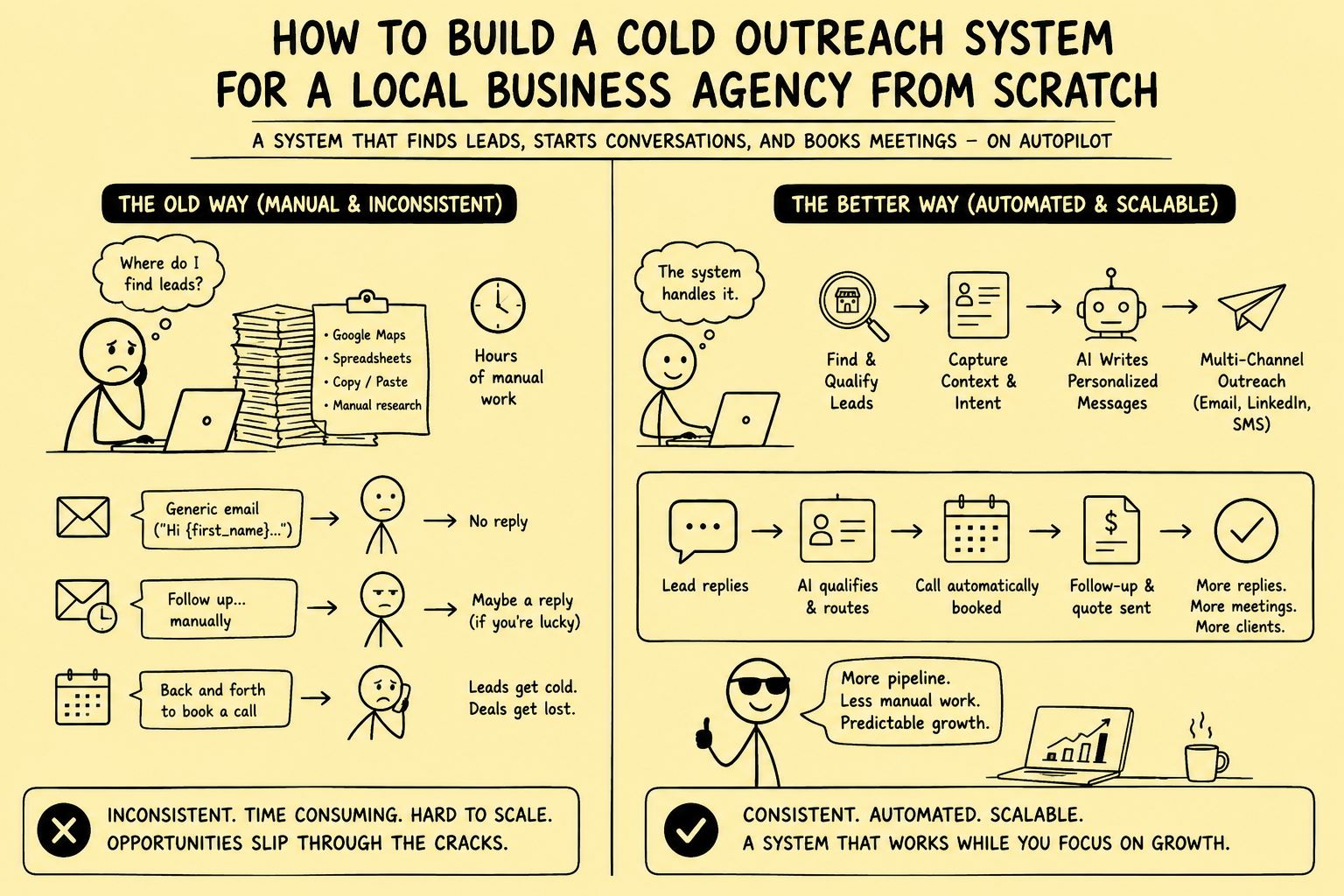
The difference between agencies that grow consistently and agencies that plateau on referrals is almost always one thing: whether they have a cold outreach system running in the background.
Not a person who does outreach when they have time. Not a burst of emails every few months. A system — a repeatable, partially automated process that generates a steady flow of qualified conversations week after week, regardless of how busy the agency is with delivery.
This guide is the step-by-step blueprint for building that system from nothing. If you follow it, you will have a functioning cold outreach system running within 30 days.
Before You Start: The Three Decisions That Determine Everything
Before touching any tool, three strategic decisions need to be made. Getting these wrong makes everything else harder. Getting them right makes everything downstream straightforward.
Decision 1: Which Niche?
The most important decision in cold outreach is niche selection. Trying to reach "local businesses" is not a niche — it is a category so broad that no message can be meaningfully relevant to all of them.
A niche worth targeting has these characteristics:
- You have genuine knowledge of their problems and language
- They have sufficient volume to sustain a months-long outreach effort (at least 500–1,000 targets in your geography)
- The average deal value justifies the outreach effort
- You have at least one relevant case study or result from working with a similar business
Good examples of agency niches for local business outreach:
- Independent dental practices in major UK cities with under 200 Google reviews
- Owner-operated gyms and fitness studios in London with under 4.2-star ratings
- Local law firms (personal injury, family law) in the Southeast US without Google Ads presence
- Independent restaurants in Manchester with inactive social media and no online ordering
Poor examples:
- "Local businesses in the UK" — too broad, no common pain point
- "Small businesses that need marketing" — no specificity, no identifiable trigger
- "Any business that needs a website" — everyone needs a website, this is not a niche
Write your niche definition in one sentence: "[Type of business] in [geography] who [specific trigger/characteristic]."
Decision 2: What Outcome Will You Offer?
Before you write a single email, define the specific outcome you promise. Not your service — your outcome.
Agencies that position around services ("we do SEO") lose to agencies that position around outcomes ("we help dental practices rank in the top 3 on Google Maps for their local area, generating 15–30 new patient enquiries per month").
The outcome should be:
- Specific and measurable ("15–30 new patient enquiries per month" not "more enquiries")
- Relevant to the niche's known pain (the dental practice owner cares about new patients, not about domain authority)
- Defensible based on your actual results for similar businesses
Your cold outreach message is built around this outcome. Everything you send should point toward it.
Decision 3: What Is the Call to Action at Each Stage?
Define the journey before you start:
- Cold email goal: A reply that begins a conversation. Not a meeting booked. Just a reply.
- First reply goal: A short back-and-forth that qualifies interest. Book a discovery call.
- Discovery call goal: Understand their situation. Present relevant case study. Propose a specific next step.
- Proposal goal: Signed engagement.
Each stage has one goal. Trying to get a meeting booked directly from a cold email typically lowers conversion because it asks for too much commitment too early. The micro-commitment approach — reply first, then call, then proposal — typically produces higher overall conversion despite appearing slower.
Phase 1: Technical Infrastructure (Days 1–5)
Step 1: Set Up a Sending Domain
Do not send cold email from your main business domain (e.g. youragency.com). If your cold email gets flagged as spam at scale, it will damage deliverability for your regular business communications.
Set up a separate sending domain — something like youragencyemail.com or youragencymail.co.uk. This domain exists solely for cold outreach.
Purchase 2–3 variants to rotate across. Most domain registrars charge £10–£15 per year per domain.
Step 2: Configure Email Authentication
For each sending domain, set up:
SPF (Sender Policy Framework): A DNS record that specifies which mail servers are allowed to send email on behalf of your domain. Without this, your emails will land in spam.
DKIM (DomainKeys Identified Mail): A digital signature that verifies emails are genuinely from your domain. Required by Gmail and Outlook for inbox delivery.
DMARC (Domain-based Message Authentication): A policy that tells email providers how to handle emails that fail SPF or DKIM checks. Set to "none" initially to monitor, then "quarantine" once you confirm authentication is working.
Your email sending tool (Instantly, Smartlead, or Google Workspace) will walk you through configuring these. It typically takes 30–60 minutes per domain.
Step 3: Warm Up the Sending Domains
New domains and new email addresses cannot send high volumes of cold email immediately — they need to build a sending reputation first. Sending 100 cold emails on day one from a brand new domain will almost certainly result in spam folder placement.
Warming up a domain means gradually increasing send volume over 3–4 weeks while maintaining high open and reply rates. Modern email warming tools (Instantly and Smartlead both include this feature) automate this by sending emails between a network of inboxes that automatically open and reply, building domain reputation.
Start warming on Day 1. By the end of Week 3, the domain should be able to handle 50–80 cold emails per day per inbox.
Step 4: Set Up Your Email Sending Tool
The three most commonly used tools for cold email sequences for agencies in 2026:
Instantly — Strong deliverability features, built-in domain warming, easy sequence management, good analytics. Best choice for most agencies starting out.
Smartlead — More powerful inbox rotation logic, better for teams sending higher volumes. Slightly more complex to set up.
Lemlist — Strong personalisation features including image and video personalisation. Better for outreach where visual personalisation adds value.
Set up your sending account, connect your warmed domains, and configure the basic sequence settings: daily sending limits (start at 30–40 per inbox, scale up), sending hours (match the business hours of your target market), and reply detection (stops the sequence automatically when a prospect replies).
Phase 2: List Building (Days 6–12)
Step 5: Build the Raw List
For local business niches, the best sources are:
Google Maps: Search for your target business type in your target geography. Export the results manually or using a scraping tool like Outscraper or PhantomBuster. Collect: business name, address, phone number, website, review count, average rating, Google Maps URL.
Apollo.io: Search by industry, location, company size, and employee count filters. Apollo gives you contact records with email addresses directly.
Hunter.io: Useful for finding individual email addresses for businesses where you have the website URL but not the owner's email.
LinkedIn: For industries where owners maintain LinkedIn presence (professional services, consultants, health practices). Search by job title, location, and company size.
Local business directories: Yelp, Checkatrade (UK), Houzz, TripAdvisor — useful for specific industries with strong directory presence.
Target: 300–500 contacts for the first sequence. Quality matters more than volume at this stage.
Step 6: Research and Qualify the List
Before building personalisation notes, qualify each prospect:
- Remove national franchises and chains (they have corporate marketing teams)
- Remove businesses that are obviously already running sophisticated marketing
- Remove businesses with large social media followings (they have in-house social capability)
- Flag businesses with clear, specific triggers that match your offer
Step 7: Build Personalisation Notes
For each remaining prospect, spend 60–90 seconds:
- Check their Google Business Profile: review count, average rating, last review date, presence of photos, categories, booking link
- Check their website: load speed (use Google PageSpeed Insights), mobile experience, call-to-action clarity
- Check social media: when did they last post, what is the engagement like
Write 1–2 specific observations per prospect in a spreadsheet column. This is the raw material for the personalised opening line of each email.
Example observations:
- "47 reviews, 4.1 stars, no responses to any reviews in 6 months, ranking 8th for 'dentist in [City]'"
- "Website loads in 7 seconds on mobile, no click-to-call button visible, contact form buried"
- "Last Instagram post 4 months ago, competitor posts daily"
Phase 3: Message and Sequence Creation (Days 10–14)
Step 8: Write the Email Templates
Using the frameworks in Cold Email Templates for Agencies Targeting Local Businesses, write:
- 1 primary template (the main outreach email)
- 3 follow-up emails (Days 4, 9, and 15 of the sequence)
- 2–3 subject line variants to A/B test
Each template should have a clear personalisation variable — the specific observation from your research notes — merged into the opening. Everything else in the email is consistent across all contacts.
Step 9: Build the Sequence in Your Sending Tool
In Instantly, Smartlead, or Lemlist:
- Create a new campaign
- Set the sequence steps: Email 1 (Day 1), Email 2 (Day 4), Email 3 (Day 9), Email 4 (Day 15)
- Configure reply detection: the sequence stops automatically when the prospect replies
- Set daily send limits (start conservatively: 30–40 per inbox per day)
- Set sending hours to match target business hours (e.g. 9am–5pm GMT for UK local businesses)
- Upload your prospect list with personalisation notes mapped to the correct variable fields
Step 10: Test Before Launching
Before sending to your full list:
- Send test emails to yourself and check inbox placement (not spam folder)
- Verify personalisation variables are merging correctly
- Check all links are working
- Read each email template aloud — if it sounds stiff or robotic, edit it
Phase 4: CRM and Workflow Setup (Days 12–16)
Step 11: Set Up Your CRM
If you do not have a CRM, use HubSpot (free tier is sufficient for starting out) or Pipedrive. The CRM is where all prospect activity is tracked — not the sending tool.
Create the following:
- A contact pipeline stage for each outreach status: "In sequence," "Replied," "Call booked," "Proposal sent," "Closed won," "Closed lost," "Not interested — future nurture"
- Custom contact properties: Niche, Personalisation notes, Sequence name, Last reply date
Step 12: Connect Sending Tool to CRM
Most cold email tools integrate natively with HubSpot and Pipedrive, or connect via Zapier/Make. The integration should:
- Create a new CRM contact automatically when a prospect is added to a sequence
- Update the CRM record when a reply is received
- Move the contact to "Replied" stage automatically when a reply is detected
Step 13: Build Reply-Handling Workflows
For each reply type, build a simple workflow in your CRM:
- Reply = positive interest: Create a "Call booked" task; enroll in a follow-up sequence if the call is not booked within 48 hours
- Reply = not right now: Move to "Future nurture" stage; enroll in a monthly nurture email sequence for 6 months
- Reply = unsubscribe: Mark "Do not contact" immediately; suppress from all future sequences
Phase 5: Launch and Optimise (Days 16–30)
Step 14: Launch the Campaign
Start sending on Day 16 (assuming domains were warmed from Day 1). Begin at 30–40 emails per day. Monitor:
- Open rate (target: 40–50% for local business outreach with good subject lines)
- Reply rate (target: 5–10% for personalised sequences to well-qualified lists)
- Bounce rate (target: under 3% — if higher, clean the list)
- Spam complaint rate (target: under 0.1%)
If open rate is low (under 30%), the subject lines need work. If reply rate is low but open rate is good, the email body needs work. If bounce rate is high, the list quality needs improving.
Step 15: Handle Replies Immediately
When replies come in, respond within the hour. Every hour that passes after a positive reply reduces the probability of booking a call. Set up a notification (Slack, email, or SMS) that fires the moment a reply is received.
Step 16: Weekly Review and Iteration
Every week, review:
- Which subject line variant is producing higher open rates?
- Which email template variant is producing higher reply rates?
- What is the reply-to-call-booking conversion rate?
- What objections are coming up in replies?
Update the templates based on findings. A/B test one new variable per week. The sequence that started on Day 16 should be meaningfully better by Day 45.
Phase 6: Scaling the System
Once the system is working — you are getting consistent replies, booking calls, and closing clients — the next question is how to scale without it consuming more of the founder's time.
Add additional niches: The infrastructure built for Niche A applies directly to Niche B. Niche B needs a new list, new personalised observations, and new templates tailored to its specific pain points. The sending infrastructure, CRM, and workflows are reused.
Add calling to the sequence: Email first, then call. Adding a call on Day 5 (after Email 1 but before Email 2) to the businesses that opened but did not reply produces meaningful additional call bookings. For the tools to build this into a combined email + call sequence, see: The Best Cold Calling Software in 2026: A Complete Buyer's Guide.
Hire a part-time research assistant: The most time-consuming manual component is the list research and personalisation notes. A part-time researcher (15–20 hours per week) can process 300–500 prospects per week with a clear research checklist, freeing the founder entirely from this step.
Automate the personalisation research: Tools like Clay can automate the research step — pulling Google review data, website metrics, and social activity for each contact automatically. This is the next level of leverage after the manual process is validated.
What the System Looks Like When It Is Running
A fully built system running at moderate scale looks like this:
Weekly inputs:
- 300–500 new contacts researched and added to the sequence (researcher: 15 hrs)
- Weekly metrics reviewed and template optimisations made (founder: 30 min)
- Replies handled and calls booked (founder/BD: 2–3 hrs)
Weekly outputs:
- 15–40 new prospects entering the sequence
- 5–15 replies managed
- 2–5 calls booked
- 0.5–2 new client proposals per week
Monthly revenue impact (at 30% close rate, £500/month average retainer):
- 8–20 calls per month
- 2–6 new clients per month
- £1,000–£3,000 in new monthly recurring revenue
Within 3–6 months of consistent operation, the compound effect of monthly new client acquisition creates a meaningfully different financial position than the agency was in before the system existed.
The Most Common Mistakes at Each Phase
Niche selection: Choosing too broad a niche. "Restaurants" is not a niche. "Independent restaurants in Manchester with under 4.0 average Google reviews" is.
Infrastructure: Skipping domain warming. This single mistake causes more cold email failures than any other. Warm the domains before sending.
List building: Prioritising volume over quality. 200 well-qualified, well-researched contacts outperform 2,000 loosely matched ones.
Message writing: Leading with the agency instead of the prospect. Every first line should be about something you observed about their specific business.
Follow-up: Sending one email and stopping. Most replies come from follow-ups. Four steps minimum.
CRM: Not setting up proper tracking before launching. If you cannot see your pipeline clearly, you cannot improve it.
Scaling: Scaling before the system works. Confirm the message-to-reply conversion is above 5% before adding volume. If it is not, fix the message first.
For the automation infrastructure that removes the manual overhead from this system — handling sequence sending, CRM logging, and post-reply workflows automatically — Systemify's outreach automation services build and configure the full stack for agencies.
Brokerage data stays governed. Material deal decisions stay human.
We design business broker systems around least-privilege access, documented data flows, protected credentials, traceable activity, and approval gates. Systemify does not use client information to train its own models. When a workflow uses an external AI provider, its purpose, data fields, and retention approach are documented and approved before client data is transferred.
Looking for business-broker systems?
Our current work focuses on helping business brokers build stronger buyer and seller pipelines and more controlled deal operations.
Talk to a Broker Systems Expert