
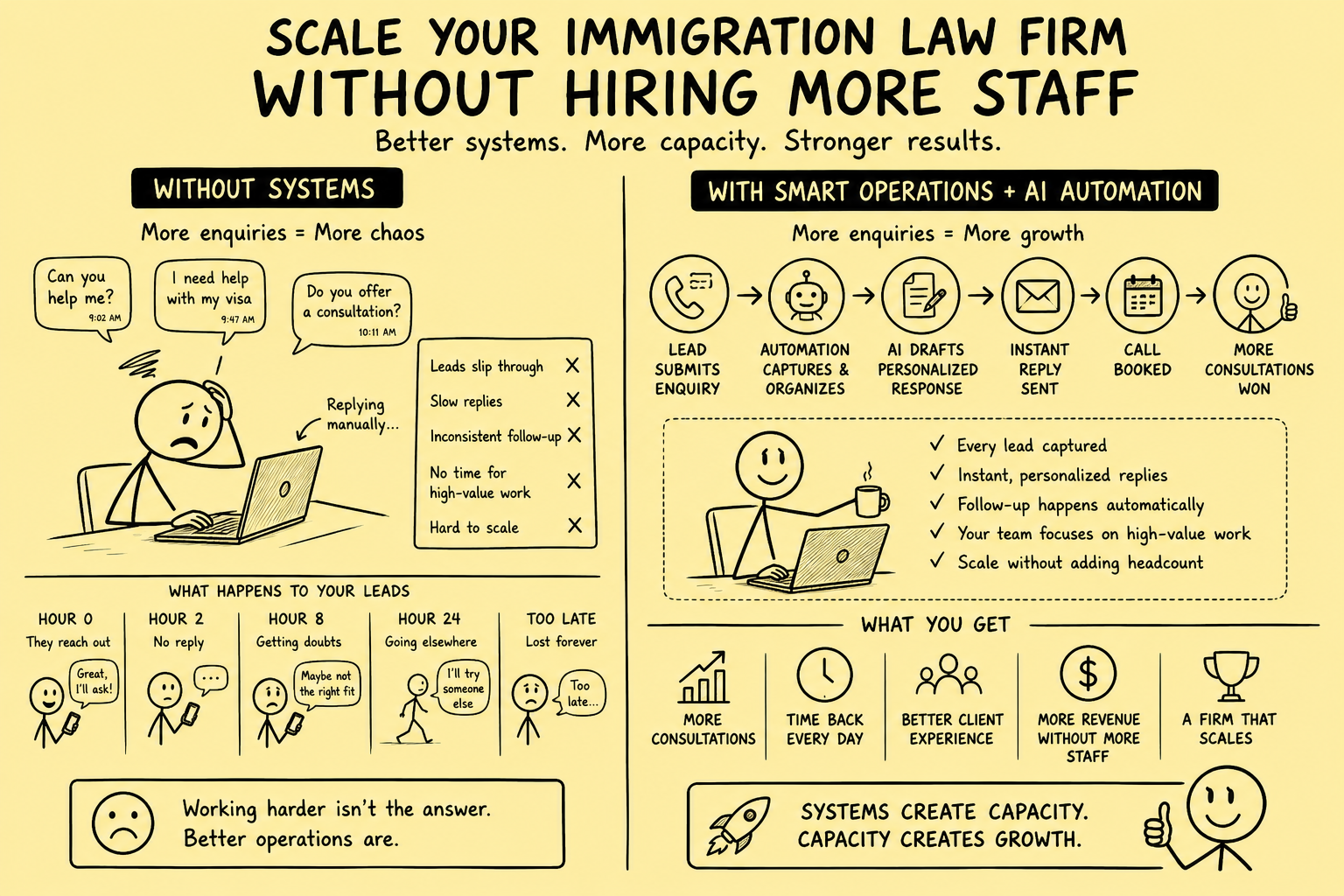
The traditional model for growing an immigration law firm is straightforward: more clients requires more lawyers, which requires more support staff, which requires more office space and management time. Growth is linear, expensive, and slow.
Automation breaks this model. A well-automated immigration practice can handle 2–3× the enquiry volume, convert significantly more leads to retained clients, and deliver a better client experience — without the overhead of proportionally more staff.
This post is for two types of immigration firms:
Firms that are already busy and want to grow without burning out: If your team is stretched thin and the idea of doubling your client load without doubling your headcount sounds impossible, this guide shows how the right automation infrastructure makes it viable.
Firms that are building their pipeline and want to grow efficiently from the start: If you're at an earlier stage and don't yet have a full team, automation lets you punch well above your weight — handling 50+ enquiries a month with the infrastructure normally associated with a much larger practice.
The Staffing Bottleneck in Immigration Law
In most immigration practices, growth eventually hits the same bottleneck: intake.
The attorney does the legal work. Someone has to answer enquiries, qualify leads, book consultations, collect documents, and chase outstanding information. As the firm grows, that "someone" becomes a full-time role — and then a team.
The problem is that most of the tasks in intake are:
- Repetitive (the same questions, the same document checklists, the same appointment booking)
- Time-sensitive (fast response is critical)
- Available to automation (nothing in early-stage intake requires qualified legal judgment)
Yet most firms staff these tasks entirely with humans — at full employment cost, with no ability to work at 3am on a Saturday.
The Five Tasks Automation Handles Better Than a Human
Task 1: First Response to Enquiries
A human checking an inbox every 30–60 minutes will never respond to every enquiry within 5 minutes, 24/7. An automation that fires on form submission will do it every time.
Automating first response:
- Removes the bottleneck of someone having to see the enquiry before acknowledging it
- Guarantees consistent, personalised acknowledgement at any hour
- Lets your human team focus on substance (the follow-up call) rather than logistics
Task 2: Lead Qualification Triage
Sorting enquiries by urgency, case type, and prospect quality is rule-based work that automation handles accurately:
- If the form says "deportation order," route to urgent queue and notify duty attorney immediately
- If the form says "general enquiry about work visas," route to standard queue
- If the form is incomplete or vague, trigger a qualification follow-up email automatically
This ensures your attorneys and intake staff spend their time on the highest-value interactions — not sorting through enquiries manually.
Task 3: Appointment Scheduling and Reminders
Booking a consultation involves several back-and-forth steps: finding a mutual time, sending calendar invites, sending reminders, handling rescheduling. This is pure logistics — it adds no value, it is just friction that costs everyone time.
With a booking tool (Calendly, Acuity, or your CRM's native scheduler) connected to your intake automation:
- Prospects book directly from the first automated response
- Calendar invites send automatically
- Reminder sequences fire 24 hours and 1 hour before the appointment
- Rescheduling is handled by the prospect without involving your team
A single implementation of this system saves 2–4 hours of admin per week for an average immigration practice.
Task 4: Pre-Consultation Document Collection
Before a consultation, the attorney needs information: the prospect's nationality, visa history, current status, any previous refusals, and copies of relevant documents. Collecting this information manually — via email back-and-forth — is time-consuming and often incomplete.
Automated pre-consultation questionnaires (sent immediately after a consultation is booked) collect this information systematically, before the attorney sits down for the call. This:
- Makes consultations more efficient (the attorney arrives prepared)
- Reduces the time needed for the consultation itself
- Creates a structured record in the CRM from day one
For overwhelmed firms, this means each consultation is shorter and more productive — allowing the same attorney to handle more consultations per week. For growing firms, it positions your practice as professional and thorough from the very first interaction.
Task 5: Follow-Up Sequences
As covered in detail in The Immigration Law Follow-Up Sequence That Books 3× More Consultations, a structured 7-day follow-up sequence handles the repeated outreach that converts undecided prospects — without requiring a team member to remember, schedule, and manually send each message.
For an immigration practice receiving 100 enquiries per month, running a 7-touch follow-up sequence manually would require approximately 10–15 hours of staff time per week. Automated, it requires zero — except for the two human phone calls per lead.
The Automation Stack for an Immigration Practice
A complete automation infrastructure for an immigration law firm does not require an IT department or a large budget. Here is what a practical stack looks like:
Intake CRM: Clio Grow, HubSpot, or Lawmatics — receives all enquiries, manages pipeline, tracks conversion
Form connection: Zapier or native CRM embed — connects website forms to CRM and triggers automations
SMS automation: Twilio (via Zapier/n8n) or CRM-native SMS — handles automated text messages
Email sequences: CRM-native email sequences (HubSpot Sequences, Clio Grow, Lawmatics) — handles automated email follow-up
Scheduling: Calendly, Acuity, or CRM booking module — handles consultation scheduling and reminders
Document collection: Clio Grow intake forms or Typeform — handles pre-consultation questionnaire
Total monthly cost: £80–£200/month depending on which tools you use
Compare this to the cost of one part-time intake coordinator at £1,200–£1,800/month — and the automation runs 24/7, never calls in sick, and handles volume consistently regardless of how busy the rest of the team is.
What Your Team Does Instead
Automation does not replace the human elements of intake — it removes the administrative overhead so your team can focus on the parts that actually require human judgment and relationship-building:
The intake call: A genuine 10–15 minute conversation to understand the prospect's situation, answer their questions, and help them understand what working with your firm involves. This cannot be automated — and it shouldn't be. It is where trust is built.
The consultation: The substantive legal discussion where the attorney assesses the case, explains the options, and recommends a path forward. This is your value proposition. Automation ensures this conversation happens with a prepared, informed prospect — not someone who is still confused about what they submitted on the form.
Relationship management: Following up with clients at key milestones in their case, proactively communicating status updates, checking in on their situation. This human touch drives reviews, referrals, and long-term retention — none of which can be automated effectively.
When automation handles the administrative layer, your team's energy goes entirely toward these high-value interactions. The quality of the client experience goes up while the hours required per client go down.
The Scaling Scenario
Here is what the growth trajectory looks like for an immigration firm that builds this infrastructure:
Before automation:
- 80 enquiries/month
- 20% conversion rate (16 retained clients/month)
- 1 intake coordinator spending 20 hrs/week on admin
- Attorney spending 6 hrs/week on intake
- Capacity ceiling: ~20 new clients/month without adding staff
After automation (same team):
- 80 enquiries/month (or more — now you can run paid ads confidently)
- 35% conversion rate (28 retained clients/month — from better response speed and follow-up)
- Intake coordinator spending 8 hrs/week on high-value tasks (calls, complex queries, client relations)
- Attorney spending 2 hrs/week on intake
- Capacity ceiling: ~35–40 new clients/month without adding staff
The same team, handling 75% more retained clients, with less time spent on intake administration.
When you do decide to hire additional staff, the automation stack means each new team member is dramatically more productive than they would be in a manual-process firm.
Getting Started: The Order of Operations
If you're starting from scratch or upgrading from a manual process, the recommended order of implementation is:
- CRM setup (1 day) — Choose your platform, connect your contact form, set up your pipeline stages
- Instant first response (1 day) — Automated SMS + email within 60 seconds of submission
- Booking integration (half day) — Direct booking link in every first response
- Triage logic (1 day) — Urgency routing and internal notifications
- Follow-up sequence (2 days) — 7-day multi-channel follow-up
- Pre-consultation automation (1 day) — Questionnaire and document collection
- Reporting dashboard (half day) — Weekly tracking of all key metrics
Total setup time: approximately one week of focused work, or two weeks if building alongside normal operations.
If you want this built for you without the setup time, Systemify Automation installs the full stack for immigration law firms and has it running in two weeks. Whether you're scaling a busy practice or building a pipeline from scratch, the infrastructure is the same — and we tailor the configuration to where you are right now.
Brokerage data stays governed. Material deal decisions stay human.
We design business broker systems around least-privilege access, documented data flows, protected credentials, traceable activity, and approval gates. Systemify does not use client information to train its own models. When a workflow uses an external AI provider, its purpose, data fields, and retention approach are documented and approved before client data is transferred.
Looking for business-broker systems?
Our current work focuses on helping business brokers build stronger buyer and seller pipelines and more controlled deal operations.
Talk to a Broker Systems Expert